RAM Usage High

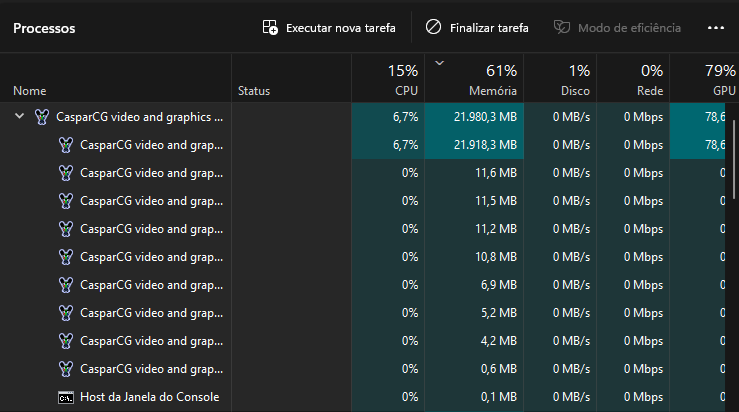
Hey! I was developing some automations with HTML Templates and noticed that the RAM Usage was almost 22GB.

I’m using 6 channels, with a HTML Template on each one, the template has a fadeIn and a fadeOut (using jQuery, by setting the opacity from 0 to 1) and stay static. Even if I clear the channels using CG STOP and CG CLEAR the RAM Usage doesn’t lower, do you guys have any idea of best practices to avoid this high RAM Usage?

Hey! To help diagnose this, I have a few questions and suggestions:

Which CasparCG server version are you using?

How long did you run the setup before noticing this RAM usage? Was it over several hours, or did it spike quickly? This helps determine if it’s a gradual leak or something more immediate.

It might be a memory leak. Try running the command gl gc in the CasparCG console. This forces garbage collection and might release the memory.

Share your CasparCG config setup.

Could you share a simplified version of one of your HTML templates? This would allow others to try and reproduce the issue and pinpoint the source of the high RAM usage.

Hey!

Sorry for that long late reply, my year was crazy hahaha

The high usage stopped, probably was something while I was developing my backend to control Caspar + the HTML Templates!

But I do remember I took some hours to start the high usage. Also thanks for the gl gc command, it really useful to know about those.

Also my Caspar config was something like this:

<?xml version="1.0" encoding="utf-8"?>
<configuration>
    <paths>
        <media-path>media/</media-path>
        <log-path disable="false">log/</log-path>
        <data-path>data/</data-path>
        <template-path>template/</template-path>
    </paths>
    <lock-clear-phrase>secret</lock-clear-phrase>
	<video-modes>
		<video-mode>
			<id>1280x765p60</id>
			<width>1280</width>
			<height>768</height>
			<time-scale>60000</time-scale>
			<duration>1000</duration>
			<cadence>960</cadence>
		</video-mode>
	</video-modes>
    <channels>
	
		<!-- SIDES LED CHANNELS -->
        <channel>
            <video-mode>1280x765p60</video-mode>
            <consumers>
                <screen>
					<name>LEFT SIDE LED</name>
				</screen>
                <system-audio />
				<ndi>
				  <name>LEFT SIDE LED</name>
				  <allow-fields>false</allow-fields>
				</ndi>
            </consumers>
        </channel>
		<channel>
            <video-mode>1280x765p60</video-mode>
            <consumers>
                <screen>
					<name>RIGHT SIDE LED</name>
				</screen>
                <system-audio />
				<ndi>
				  <name>RIGHT SIDE LED</name>
				  <allow-fields>false</allow-fields>
				</ndi>
            </consumers>
        </channel>		
		
    </channels>
    <controllers>
        <tcp>
            <port>5250</port>
            <protocol>AMCP</protocol>
        </tcp>
    </controllers>
    <amcp>
        <media-server>
            <host>localhost</host>
            <port>8000</port>
        </media-server>
    </amcp>
</configuration>

But I had in total 6 channels with the same custom settings.

Also here’s a simplified version of the template: https://drive.google.com/file/d/1MdZGfuHmKN04A_7r4luqJCVxWKiEIDQj/view?usp=sharing

I know my issue is already solved, but I’ve just updated here so we can have an archive of what happen and to share my template that maybe will be helpful to someone else! :slight_smile: