DJ HTML Creator — Visual Editor for CasparCG HTML Templates

Hey everyone,

I’ve been working on a desktop application called DJ HTML Creator that lets you visually design and animate HTML templates for CasparCG (also works with vMix and OBS).

Instead of hand-coding HTML/CSS/JS, you get a familiar motion graphics workflow — think After Effects-style timeline with keyframe animation, but everything exports as a single self-contained HTML file ready for CasparCG.

Key features:

  • Visual timeline editor with keyframe animation (position, scale, rotation, opacity) and easing curves (ease in/out, bezier)

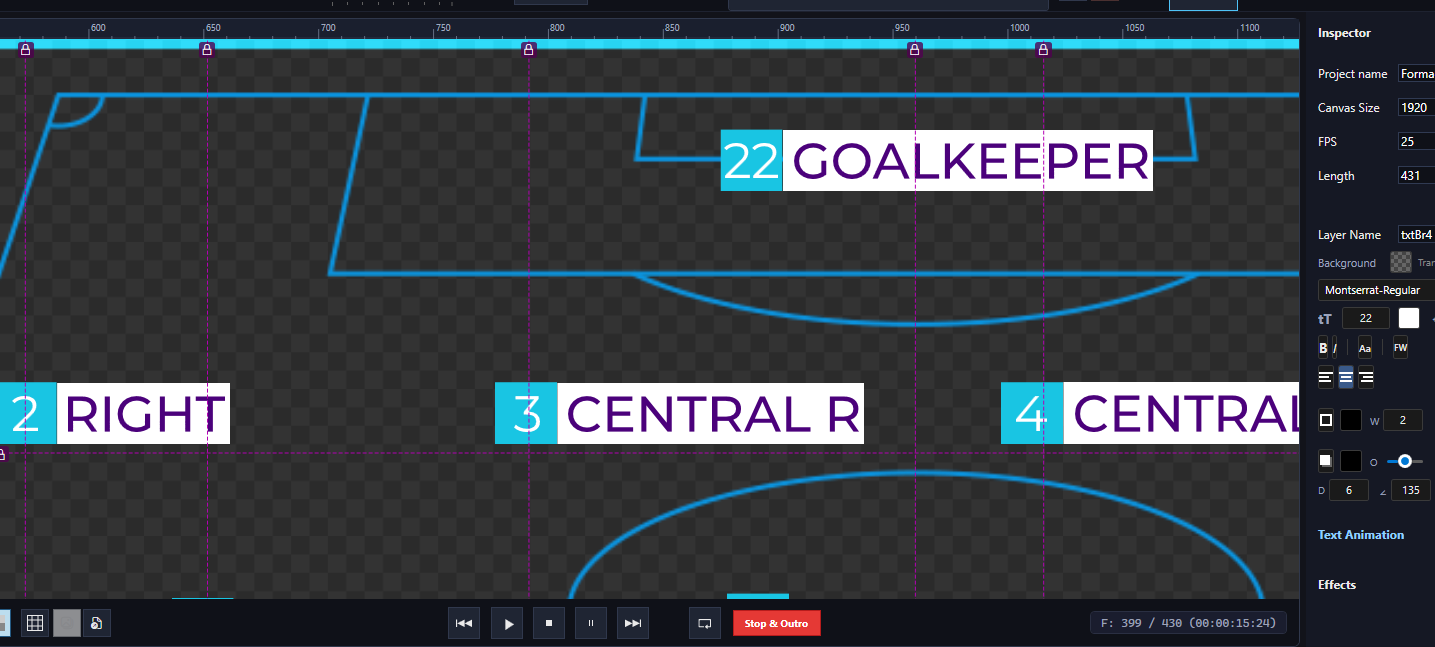
  • Text layers with full styling (fonts, colors, outlines, shadows, gradients, letter spacing, background), including Fit Width — automatically scales long text to fit a defined area, perfect for dynamic name supers

  • Dynamic text & images via CasparCG update() — just name your layers and update them live from your playout system

  • Crawl / ticker text with adjustable speed and direction

  • Shape layers (rectangles, circles, pen tool paths with bezier curves)

  • Mask system with feathering, animation, and invert — great for reveal animations and shaped cutouts

  • Effects — blur, drop shadow, sepia, brightness, contrast, hue rotate, grayscale, and more

  • Nested compositions — build reusable components and nest them inside other compositions

  • PSD import — import Photoshop files as separate layers or merged

  • Video layers — MP4 and MOV (ProRes 4444 with alpha channel)

  • Image sequences, atlas/sprite sheets support

  • Single HTML file export — everything embedded, just drop it into CasparCG and go

  • Text animation presets — pre-built character-by-character animations you can apply with one click

  • Intro/outro support — set a STOP marker to define where the template holds, then trigger outro on stop()

Export is optimized for CasparCG’s CEF renderer — frame-accurate playback with full play() / stop() / update() control.

I’ve already used this application to create broadcast graphics for international sports productions, so most of the features have been tested and refined in real-world, on-air environments. That said, the application is still actively in development — there are certainly things that need to be polished and improved, and new features are being added regularly.

I’d love to hear your suggestions on what functionality would be most useful for your broadcast workflows. Your feedback will directly help shape the direction of development!

Download: https://djhtmlcreator.com
Free 7-day trial included so you can test everything before purchasing.

The app runs on Windows and the exported templates work in CasparCG Server 2.x, vMix, and OBS Browser Source.

Looking forward to your feedback!
Looks interesting. - I just did a quick test.

I would not mention Loopic everywhere in the export UI and the generated code, because they might not like that.

Have you ever considered supporting OGraf?

Thanks for the note regarding Loopic mentions.

As for OGraf support — why not! I’m adding it to my to-do list.

Version 1.1 is now available for download, adding support for oGraf and SPX. It’s only been lightly tested, so feel free to give it a try. Looking forward to your feedback!

I did not try the software yet, but only read the manual.

When you have dynamic text fields is it possible to changes certain background elements

to match the length of the text?

You can turn on background for text and then you have something like background element to match text. I had similar problem for soccer formation and solved in that way.

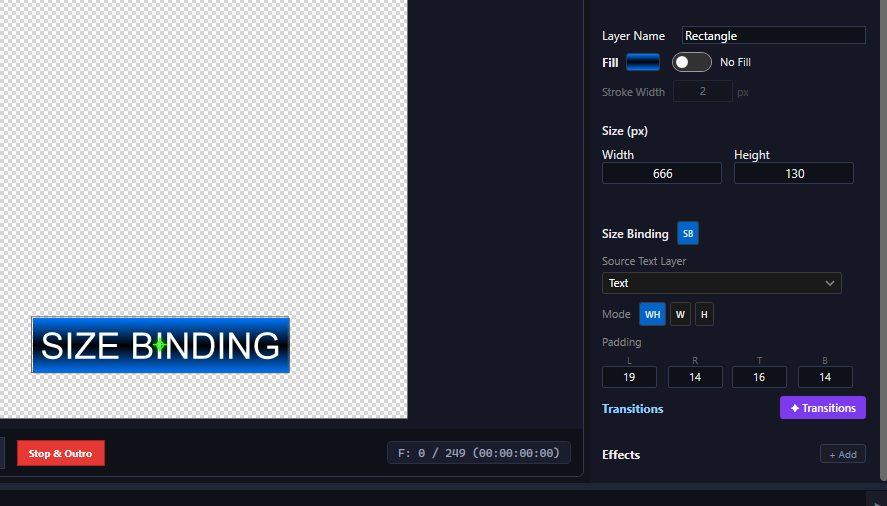
Version 1.2 is now available for download. Among other new features, we’ve added a ‘Size Binding’ (SB) option. You can place a shape (like a rectangle), enable the SB option, select the parent text layer, and adjust the padding for all four sides around the text. The shape will now dynamically resize based on the text’s size and length. I’ve tested this in CasparCG and it works exactly as it should, seamlessly adapting to the text length.

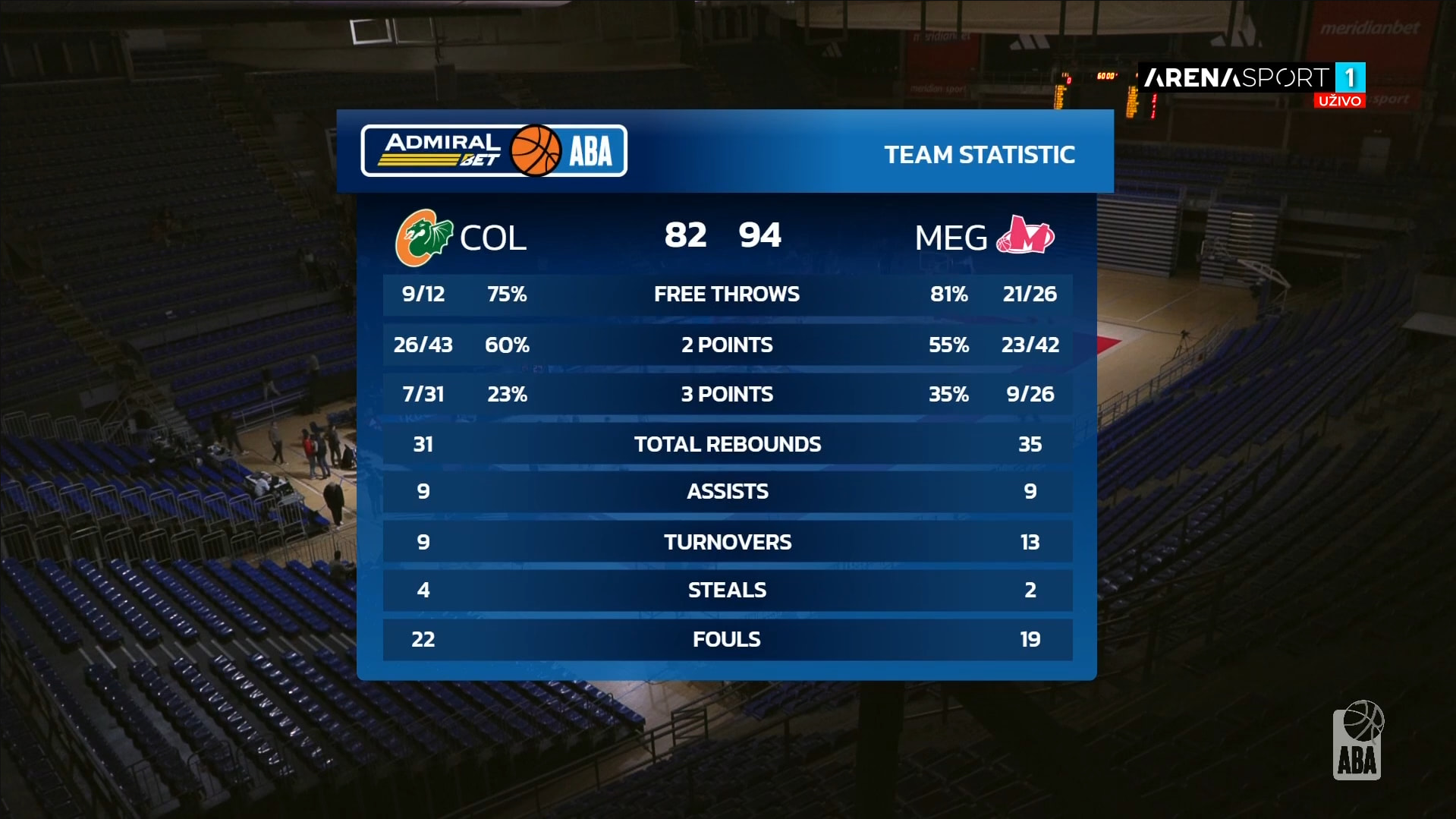
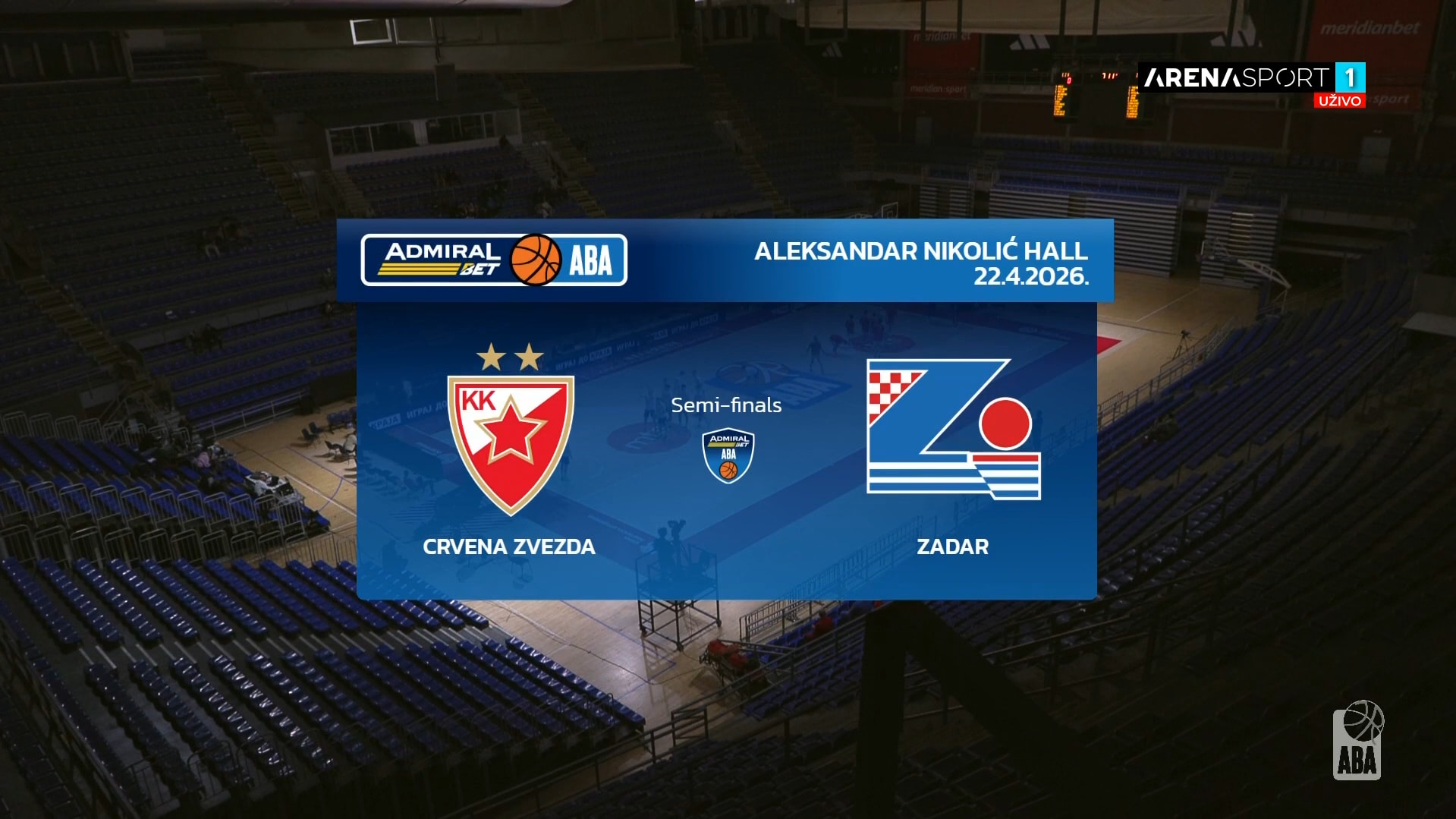
Quick update — DJ HTML Creator went on air for its first major live TV

event this week: the ABA League Junior Final Tournament in Belgrade

(April 21–23, 2026), broadcast from Aleksandar Nikolić Hall.

Templates were built in the editor from the production team’s design

package, then driven at runtime by a custom-built control application

talking to a CasparCG server.

The full graphic package covered the broadcast arc end-to-end:

match ID, tournament bracket, referees, rosters, starting fives,

in-game score bug, quarter-break scoreboard, timeouts, team statistics,

and game leaders.

Screenshots from the actual broadcast and a short breakdown of the

pipeline:

Also — versions 1.3 and 1.4 shipped since the last update here, with

several of the ideas from this thread folded in. Thanks again

@didikunz and @Theo for the early feedback.

Happy to dig into anything useful to the community.

Hey everyone,

Based on feedback from people who downloaded DJ HTML Creator and ran out of the 7-day trial before they could properly evaluate it for real broadcast work, I’ve changed how the trial works.

As of v1.5.2:

  • No time limit. Use the full app as long as you want.

  • No feature limits. Every layer type, every effect, unlimited compositions, unlimited duration — all available in trial.

  • The trade-off: HTML files exported in trial mode show a small “DJ HTML Creator — Trial” badge in the bottom-right corner. In-app preview, .htmc project files, and image-sequence exports stay clean — the badge only appears on the final HTML you’d ship to broadcast.

That means you can actually build a full template package, test it on your CasparCG playout, run it through your control app, and show your work to a producer — all without paying anything. Activate a license whenever you decide you want the watermark gone.

If your old trial expired — install v1.5.2 over your existing version and the app reopens in unlimited trial mode automatically.

A few other things from recent versions:

  • HTML import (v1.5.1) — open exported HTML templates back as fully editable projects. Templates exported from other broadcast tools are auto-detected and converted to native projects too.

  • 8× smaller, 6–8× faster exports (v1.5.0) — WebP encoding instead of PNG, parallel ffmpeg workers.

Download: https://djhtmlcreator.com

Would love feedback — especially from anyone who tried earlier versions and bounced because of the trial limits. Does the watermarked-trial model work for how you’d want to evaluate this?

Did you vibe-copy your own version of Loopic, and are now charging people for your copy? I find that reprehensible and deeply immoral.

No, I didn’t vibe-copy Loopic. This is an application I built primarily for myself, because I actually use it in my own work. Over the years I’ve used Loopic, After Effects, and plenty of other tools to build my own broadcast templates, so I know the space well.
If you’ve actually tried the app, you’ll see it’s quite different from Loopic — though there are some similarities, sure. The biggest overlap is that both applications export HTML templates. But by that logic, any tool that exports HTML would be a Loopic copy, which is obviously absurd.
As for AI — yes, I use it a fair amount, but only to speed things up where it makes sense, the same as most developers do today.

So the fact that early versions of “your” app’s GUI mentioned Loopic was just something you hand-coded and later removed? Or the fact that “your” website linked to Loopic’s Discord server was also a human error that you fixed?

I don’t know why you’re so determined to prove this is a copy of Loopic when all you have to do is open the app and see that it has far more in common with After Effects. Yes, the first version mentioned Loopic, because — as I already said — it was my reference point for the HTML export side of things. The website was generated entirely by AI based on my guidelines, and it put Loopic in the Discord channel field for reasons known only to itself.

I really don’t want to keep defending myself here. At the end of the day, it’s clear you’ve already made up your mind, and that’s not something I can change.

Earlier today I was only responding to the accusations briefly because I was in the middle of a busy workday. I’ve only just realized who @hummelstrand actually is and how much his “your” app comment offended me, so I need to write this out and put an end to all of it.

You’re an admin of this forum, as far as I can see, and you should be ashamed of addressing forum members this way with your false accusations — especially after all the work and sacrifice I’ve put in over more than a year to build DJ HTML Creator. You’ve insulted me, and your word as an admin is supposed to carry weight.

Let me now explain how the development of this application actually went, though I suspect you had ulterior motives when you came after me. I’ve been developing this application since the beginning of last year, dedicating a lot of my free time to it, primarily to make my own work easier. Up until two years ago I, like most people, was using Loopic, and the reason I started building this software was precisely Loopic’s pricing — which I felt was too high, especially for someone who only occasionally needs to produce HTML templates. If you want to talk about morality: hundreds, possibly thousands of people worked with Loopic and provided feedback and bug reports for years, and the thanks they got was a high price tag. That’s all perfectly legal, of course — a creator is free to value their work however they want.

So, after nearly a year of building the core of this application, I got to the part where everything created inside it had to be exported to HTML. I took one of my own old templates, exported from Loopic long ago, as a reference. I used AI here to speed up the process, since my domain is C#, not HTML. That’s why traces of the Loopic export remained in the first version — something @didikunz kindly pointed out to me, and I’m grateful to him for it. As for the website, I’ve already explained: the AI probably dropped Loopic into the Discord field precisely because of that HTML export reference.

And while we’re on the subject of morality — my internal version actually contains a .loo importer that I used to convert all my own Loopic projects into .htmc so I could keep editing them for my own work. I have not released that importer and I will not release it to anyone, first for the very “moral reasons” you’re invoking, and also because I don’t believe the creator of Loopic would “appreciate” it.

Now let’s actually compare DJ HTML Creator with Loopic. DJ HTML Creator is an offline Windows application; Loopic is an online, web-based, cross-platform application — so I don’t really see how I’m even competing with them. Second, my GUI resembles Loopic about as much as Loopic resembles After Effects, and I haven’t seen you lecturing the creator of Loopic on this forum about After Effects. Third, and most importantly, I’m not dragging anyone by the sleeve to use my application — people who like it use it, people who don’t, don’t. I think it’s good for the community to have more options, including a more affordable one like this.

I apologize to everyone on this forum for taking up your time with all of this, but I couldn’t stay silent in the face of insults like these. As for you, @hummelstrand — I hope it’s at least a little clearer now how Loopic ended up slipping into the first version of my application, and I also hope no one else on this forum will ever have to justify themselves to you again about anything.

Regards, Darko, creator of DJ HTML Creator

Hi,

This looks very promising!

is this app able to export also in formats used bij Vmix and Tricaster?

Hi Theo,

Thanks again for the kind words and for testing!

About vMix and TriCaster:

  • vMix: I’ve tested it with a basic animation — alpha/transparency works and the exported HTML loads into vMix as expected. I haven’t done any serious production work in vMix myself, but the basic integration is confirmed.

  • TriCaster: I’m honestly not very familiar with TriCaster, but I had a quick look at the documentation — the same HTML I export for vMix should work in TriCaster’s Web Browser source as well, since it’s standard HTML5 with a transparent background and only uses standard browser APIs.

The export is essentially a standard HTML5 page, so any production system with an HTML5 browser source can use it.

If you run into anything specific, please let me know.

Best regards,
Darko