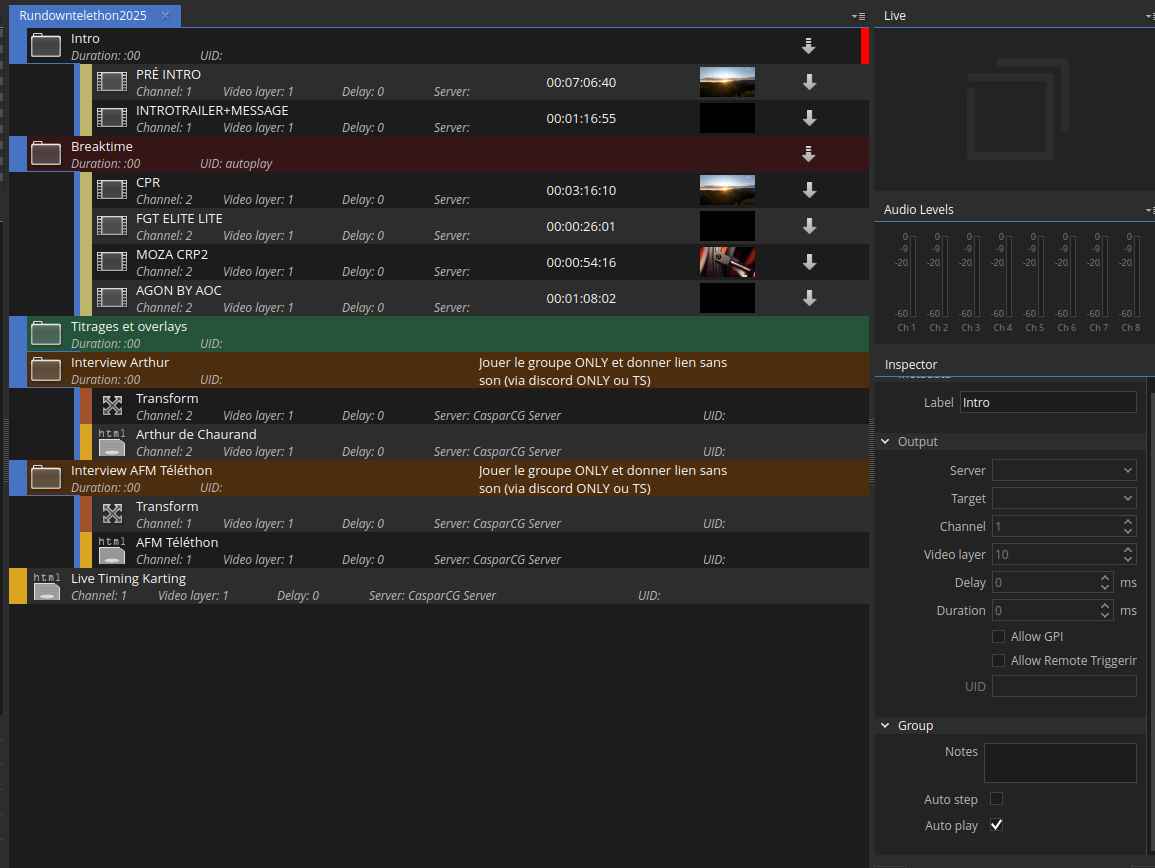
Hello guys !
As many of you advised me, i bought a Blackmagic Duo 2 card for my Atem Television Studio Pro HD. But, unfortunately, i encounter some logs issues when i start my CasparCG server.
Here my config file:
<?xml version="1.0" encoding="utf-8"?>
<configuration>
  <paths>
    <media-path>/home/casparcg/Documents/media/</media-path>
    <log-path>/home/casparcg/Documents/log/</log-path>
    <data-path>/home/casparcg/Documents/data/</data-path>
    <template-path>/home/casparcg/Documents/template/</template-path>
  </paths>

   <channels>
      <channel>
        <video-mode>1080p5994</video-mode>
        <straight-alpha-output>true</straight-alpha-output>
          <consumers>
            <decklink>
              <device>1</device>
                <embedded-audio>true</embedded-audio>
                <latency>low</latency>
                <keyer>external</keyer>
                <key-only>false</key-only>
                <buffer-depth>3</buffer-depth>
            </decklink>
          </consumers>
      </channel>

      <channel>
        <video-mode>1080p5994</video-mode>
        <straight-alpha-output>true</straight-alpha-output>
          <consumers>
            <decklink>
              <device>2</device>
                <embedded-audio>true</embedded-audio>
                <latency>low</latency>
                <keyer>external</keyer>
                <key-only>false</key-only>
                <buffer-depth>3</buffer-depth>
            </decklink>
          </consumers>
      </channel>
  </channels>

  <controllers>
    <tcp>
      <port>5250</port>
      <protocol>AMCP</protocol>
    </tcp>
  </controllers>

  <osc>
    <predefined-clients>
      <predefined-client>
        <address>127.0.0.1</address>
        <port>6251</port>
      </predefined-client>
    </predefined-clients>
  </osc>
</configuration>
My Blackmagic Desktop Video Setup :
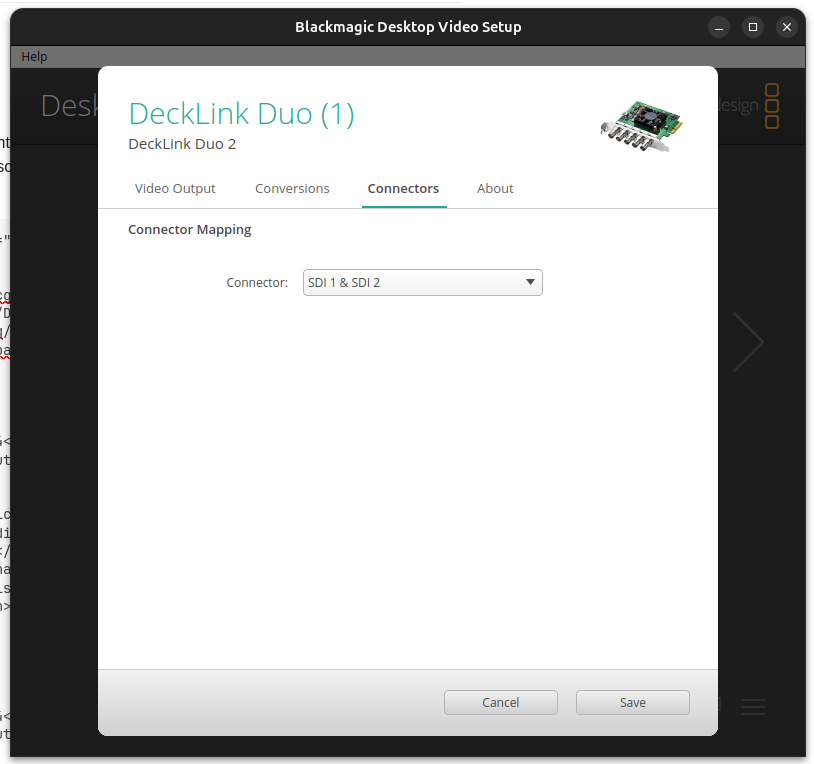
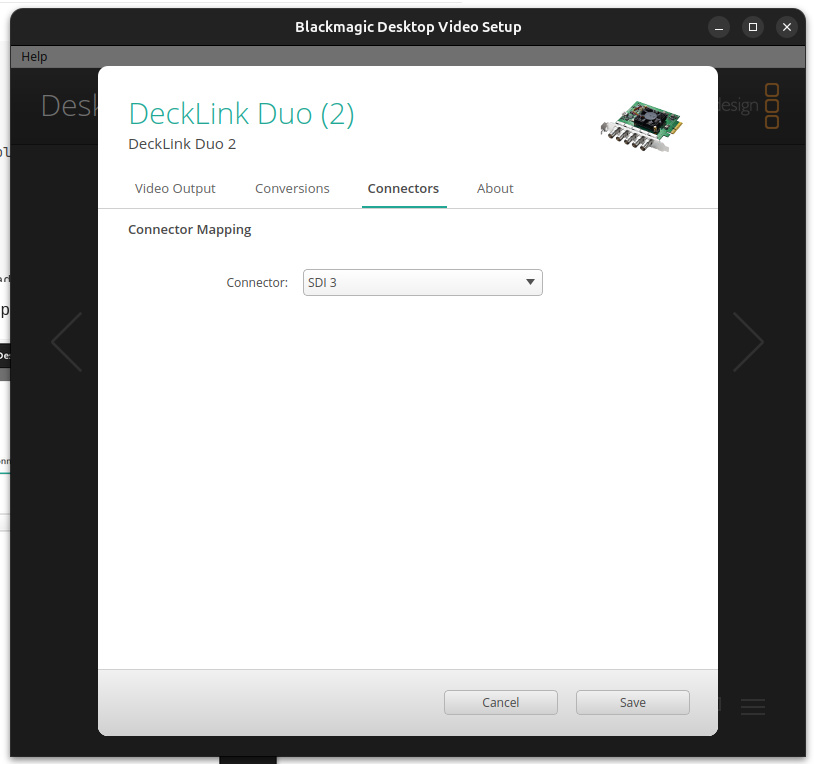
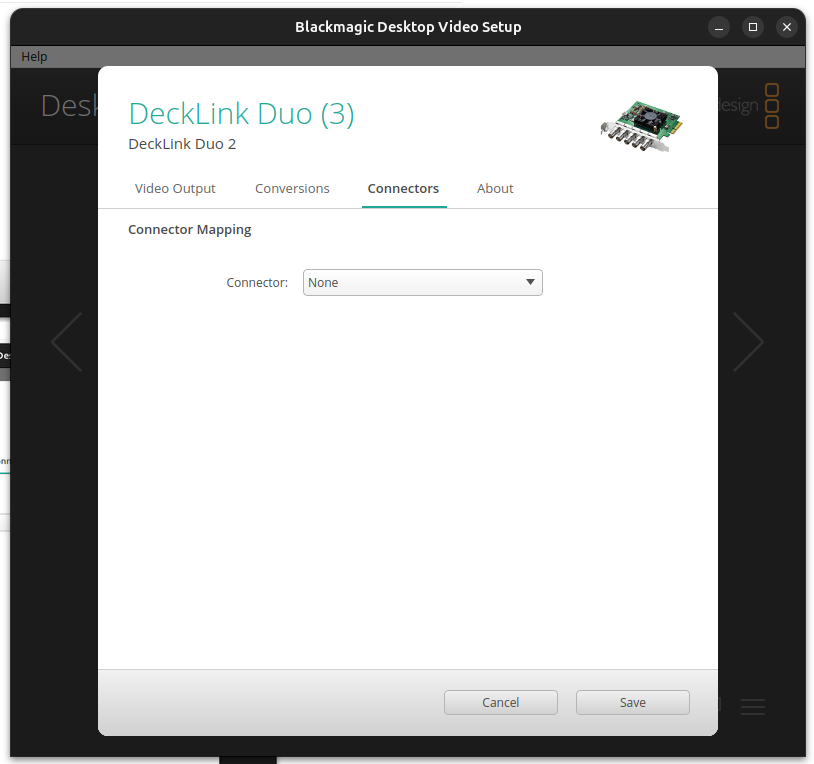
All of my channels are setup in 1080p59.94 too
My cable behind the card :
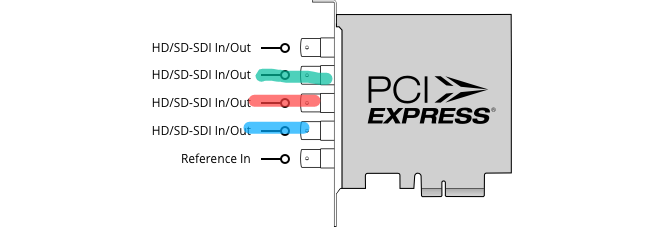
Green = fill
Red = video
Blue = key
Am i correct here ?
I am running on a Ubundu
My error log from CasparCG Server 2.4.3 Stable version :
[2025-09-29 12:07:39.899] [info]    ############################################################################
[2025-09-29 12:07:39.899] [info]    CasparCG Server is distributed by the Swedish Broadcasting Corporation (SVT)
[2025-09-29 12:07:39.899] [info]    under the GNU General Public License GPLv3 or higher.
[2025-09-29 12:07:39.899] [info]    Please see LICENSE.TXT for details.
[2025-09-29 12:07:39.899] [info]    http://www.casparcg.com/
[2025-09-29 12:07:39.899] [info]    ############################################################################
[2025-09-29 12:07:39.899] [info]    Starting CasparCG Video and Graphics Playout Server 2.4.3 N/A Stable
[2025-09-29 12:07:39.900] [info]    "/usr/share/casparcg-server-2.4/casparcg.config":
[2025-09-29 12:07:39.900] [info]    -----------------------------------------
[2025-09-29 12:07:39.900] [info]    <?xml version="1.0" encoding="utf-8"?>
[2025-09-29 12:07:39.900] [info]    <configuration>
[2025-09-29 12:07:39.900] [info]       <paths>
[2025-09-29 12:07:39.900] [info]          <media-path>/home/casparcg/Documents/media/</media-path>
[2025-09-29 12:07:39.900] [info]          <log-path>/home/casparcg/Documents/log/</log-path>
[2025-09-29 12:07:39.900] [info]          <data-path>/home/casparcg/Documents/data/</data-path>
[2025-09-29 12:07:39.900] [info]          <template-path>/home/casparcg/Documents/template/</template-path>
[2025-09-29 12:07:39.900] [info]       </paths>
[2025-09-29 12:07:39.900] [info]       <channels>
[2025-09-29 12:07:39.900] [info]          <channel>
[2025-09-29 12:07:39.900] [info]             <video-mode>1080p5994</video-mode>
[2025-09-29 12:07:39.900] [info]             <straight-alpha-output>true</straight-alpha-output>
[2025-09-29 12:07:39.900] [info]             <consumers>
[2025-09-29 12:07:39.900] [info]                <decklink>
[2025-09-29 12:07:39.900] [info]                   <device>1</device>
[2025-09-29 12:07:39.900] [info]                   <embedded-audio>true</embedded-audio>
[2025-09-29 12:07:39.900] [info]                   <latency>low</latency>
[2025-09-29 12:07:39.900] [info]                   <keyer>external</keyer>
[2025-09-29 12:07:39.900] [info]                   <key-only>false</key-only>
[2025-09-29 12:07:39.900] [info]                   <buffer-depth>3</buffer-depth>
[2025-09-29 12:07:39.900] [info]                </decklink>
[2025-09-29 12:07:39.900] [info]             </consumers>
[2025-09-29 12:07:39.900] [info]          </channel>
[2025-09-29 12:07:39.900] [info]          <channel>
[2025-09-29 12:07:39.900] [info]             <video-mode>1080p5994</video-mode>
[2025-09-29 12:07:39.900] [info]             <straight-alpha-output>true</straight-alpha-output>
[2025-09-29 12:07:39.900] [info]             <consumers>
[2025-09-29 12:07:39.900] [info]                <decklink>
[2025-09-29 12:07:39.900] [info]                   <device>2</device>
[2025-09-29 12:07:39.900] [info]                   <embedded-audio>true</embedded-audio>
[2025-09-29 12:07:39.900] [info]                   <latency>low</latency>
[2025-09-29 12:07:39.900] [info]                   <keyer>external</keyer>
[2025-09-29 12:07:39.900] [info]                   <key-only>false</key-only>
[2025-09-29 12:07:39.900] [info]                   <buffer-depth>3</buffer-depth>
[2025-09-29 12:07:39.900] [info]                </decklink>
[2025-09-29 12:07:39.900] [info]             </consumers>
[2025-09-29 12:07:39.900] [info]          </channel>
[2025-09-29 12:07:39.900] [info]       </channels>
[2025-09-29 12:07:39.900] [info]       <controllers>
[2025-09-29 12:07:39.900] [info]          <tcp>
[2025-09-29 12:07:39.900] [info]             <port>5250</port>
[2025-09-29 12:07:39.900] [info]             <protocol>AMCP</protocol>
[2025-09-29 12:07:39.900] [info]          </tcp>
[2025-09-29 12:07:39.900] [info]       </controllers>
[2025-09-29 12:07:39.900] [info]       <osc>
[2025-09-29 12:07:39.900] [info]          <predefined-clients>
[2025-09-29 12:07:39.900] [info]             <predefined-client>
[2025-09-29 12:07:39.900] [info]                <address>127.0.0.1</address>
[2025-09-29 12:07:39.900] [info]                <port>6251</port>
[2025-09-29 12:07:39.900] [info]             </predefined-client>
[2025-09-29 12:07:39.900] [info]          </predefined-clients>
[2025-09-29 12:07:39.900] [info]       </osc>
[2025-09-29 12:07:39.900] [info]    </configuration>
[2025-09-29 12:07:39.900] [info]    -----------------------------------------
[2025-09-29 12:07:39.900] [info]    Initialized video modes.
[2025-09-29 12:07:40.303] [info]    Initializing OpenGL Device.
[2025-09-29 12:07:40.331] [info]    Initialized OpenGL 4.5.0 NVIDIA 580.65.06 NVIDIA Corporation
[2025-09-29 12:07:40.376] [info]    Initialized OpenGL Accelerated GPU Image Mixer for channel 1
[2025-09-29 12:07:40.376] [info]    video_channel[1|1080p5994] Successfully Initialized.
[2025-09-29 12:07:40.376] [info]    Initialized OpenGL Accelerated GPU Image Mixer for channel 2
[2025-09-29 12:07:40.376] [info]    video_channel[2|1080p5994] Successfully Initialized.
[2025-09-29 12:07:40.377] [info]    Initialized channels.
[2025-09-29 12:07:40.377] [info]    Initialized command repository.
[2025-09-29 12:07:40.377] [info]    Initialized image module.
[2025-09-29 12:07:40.377] [info]    Initialized ffmpeg module.
[2025-09-29 12:07:40.377] [info]    Initialized oal module.
[2025-09-29 12:07:40.377] [info]    Initialized decklink module.
[2025-09-29 12:07:40.377] [info]    Initialized screen module.
[2025-09-29 12:07:40.377] [info]    Initialized newtek module.
[2025-09-29 12:07:40.377] [info]    Initialized artnet module.
[0929/120740.547004:WARNING:policy_logger.cc(148)] :components/enterprise/browser/controller/chrome_browser_cloud_management_controller.cc(88) Could not create policy manager as CBCM is not enabled.
[2025-09-29 12:07:40.552] [info]    Initialized html module.
[2025-09-29 12:07:40.552] [info]    Initialized modules.
[2025-09-29 12:07:40.563] [info]    Device may not support video-format: 1080p59.94
[2025-09-29 12:07:40.564] [info]    DeckLink Duo 2 [1-1|1080p5994] Enabled embedded-audio.
[2025-09-29 12:07:40.564] [info]    DeckLink Duo 2 [1-1|1080p5994] Enabled low-latency mode.
[2025-09-29 12:07:40.564] [info]    DeckLink Duo 2 [1-1|1080p5994] Enabled external keyer.
[2025-09-29 12:07:40.579] [info]    DeckLink Duo 2 [1-1|1080p5994] Initialized.
[2025-09-29 12:07:40.591] [info]    Device may not support video-format: 1080p59.94
[2025-09-29 12:07:40.591] [info]    DeckLink Duo 2 [2-2|1080p5994] Enabled embedded-audio.
[2025-09-29 12:07:40.591] [info]    DeckLink Duo 2 [2-2|1080p5994] Enabled low-latency mode.
[2025-09-29 12:07:40.591] [error]   DeckLink Duo 2 [2-2|1080p5994] Failed to enable external keyer.
[2025-09-29 12:07:40.611] [info]    DeckLink Duo 2 [2-2|1080p5994] Initialized.
[2025-09-29 12:07:40.611] [info]    Initialized startup producers.
[2025-09-29 12:07:40.611] [info]    Initialized controllers.
[2025-09-29 12:07:40.611] [info]    Initialized osc.
[2025-09-29 12:07:40.621] [info]    DeckLink Duo 2 [1-1|1080p5994] Reference signal: not detected.
[2025-09-29 12:07:40.630] [info]    DeckLink Duo 2 [2-2|1080p5994] Reference signal: not detected.
[0929/120740.715297:WARNING:sandbox_linux.cc(393)] InitializeSandbox() called with multiple threads in process gpu-process.
My objective :
- 1 key and fill (so 2 output from decklink for my ATEM)
- 1 vidéo output (as source for my ATEM)
Thank you, again, for your help !
Arthur