I just wanted to “steal” your trick for my upcoming tool, so it need to work for my stuff also, to be able to build it into it. Now testing embedding fonts with the “Glyph” setting…
No need to do anything from your side. Thanks 
I just wanted to “steal” your trick for my upcoming tool, so it need to work for my stuff also, to be able to build it into it. Now testing embedding fonts with the “Glyph” setting…
No need to do anything from your side. Thanks
The loop is works fine both Internal and External. But it is not good if loop duration is longer because the Stop is waiting loop run till the end point to execute. It would be good if you we can make loop in a pre-comp and comp loop start when the animation start.
Can you describe the design of your loop, just so I understand what you want it to do, or post a screen dump? How do you want your loop animation to behave when a stop is called?
The reason for the wait is to avoid jump cuts, so removing that feature will make an animation loop, pre-comp or not, jump to the stop marker from wherever it is in the animation cycle. What I have been doing in some templates is having the loop animation fade out when a stop is called. But that only works with an external loop, and the design of the loop animation allowed it.
But I will update the loop settings as soon as possible, so you can disable the waiting for the loop to end before a stop animation is started…
In a loop pre-comp I made a Logo ratation 360 degree. In the Main Comp I use loop pre-comp combine with other layers element and anitation IN(Intro) by position all layer from off screen Left then all the elements position to the right when Out called (Outro).
Is it possible to call the pre-comp animation when the START is called and stop When the STOP is called?
In this scenario, the pre-comp animation timeline is not depend on MAIN COMP timeline.
Sorry, my English is not good. 
As far as I know, there is not a way to have precomp run on its own; it will follow the main comp timeline. If you have it as an external animation, you can manipulate the div element that contains the loop. So yes, it can be done, but not directly from AE, and there are some design limits.
I know nothing about javascript nor HTML CSS. The Bodymovin and your solution made me think about using CasparCG to replace my old current graphic system. But now I’m facing some problems. It is not about the loop, the biggest is not support my language, the combine keys is not show correctly with Bodymovin export. Do you have any idea?
What language do you mean? Can you show some examples? Do they show up correctly in After Effects? Does the used font correctly support these combine keys?
I am working on a tool, that can be used to automate the creation of templates from BodyMovin json-files, so that users do not need to know anything about JavaScript etc. to create templates. That is why I ask about these language issues.
My language is Khmer. The unicode range is 1780-17FF.
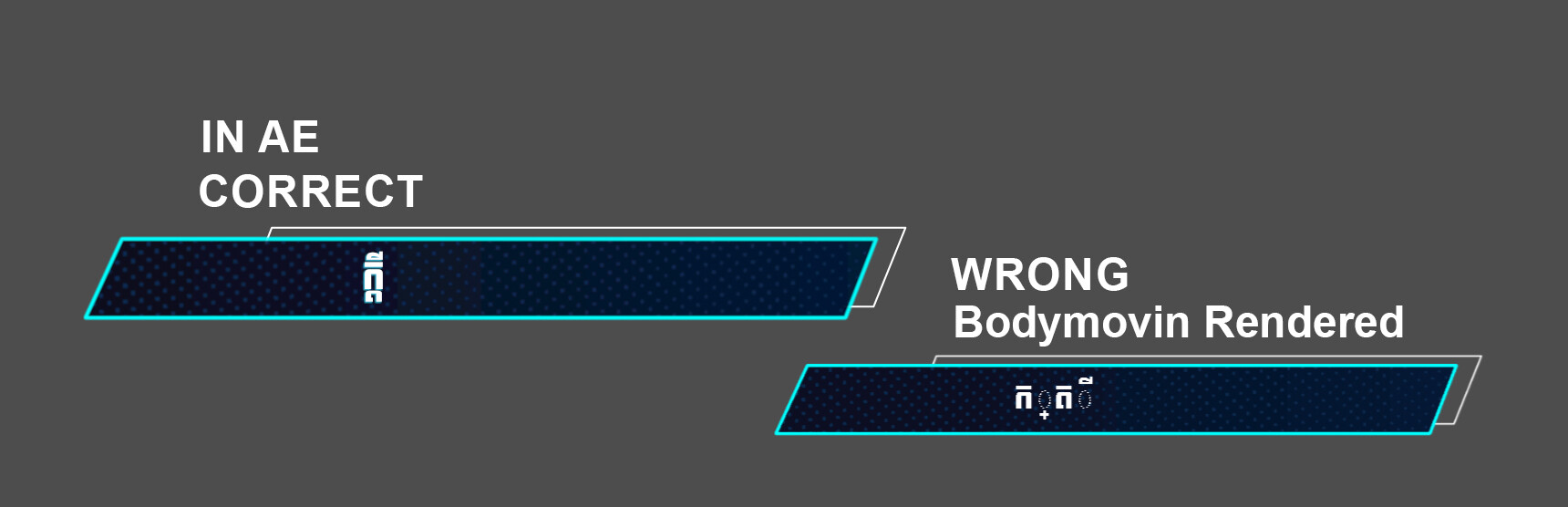
Yes, it is show correctly in AE and font style also show correctly when exported by Bodymovin but the combine keys character is not correct. I will share some screenshot. Is it ok to share image here?
Sure, there is that upload button on the top of the editor here. Or you can drag and drop it into the editor.
Thanks for posting this pictures. What I forgot to ask before. Do you have some other template, that is not done with Bodymovin, to check if the problem is with Bodymovin or CasparCG? Because I am not 100% sure, that Caspar is handling this correct. Would be bad to blame Bodymovin for a Caspar problem.
the template build from pure HTML CSS and Adobe Animate CC is works correctly.
but with Bodymovin text is not show correctly both on CasparCG and Chrome browser.
I tried with this word: អក្សរខ្មែរ
(I don’t understand Khmer, but I believe that word contains some combined keys) and got the same result.
Combined keys are seen as individual keys in BodyMotion, so the result looks different, but in a regular HTML template output is equal to input.
Yes, you are correct. in Khmer language most word contains combines keys. Do you have any solution to make it works in Bodymovin?
Maybe it would make sense to issue a bug report on BodyMovin’s GitHub page.
Unfortunately not at the moment. It looks like this has been an issue for other languages too according to this So as @didikunz suggests start a new issue at the lottie github
I see, Bodymovin have problem with combine keys languages. Anyways, thank both of you.
Here is an html-template with description on how you can use Lotties you exported with Bodymovin from AE with CasparCG: (not the same, but solutionwise comparable to the Template from Heine)
A while ago I also started to explore which expressions work and dropped some succesfull tests in a repository to document working functionalities like speed, bounce, changing colors, position, linegraph, typewriter