\
**Category:** General\
**Tags:** client\
**Created:** [September 18, 2018, 4:14pm UTC](https://casparcgforum.org/t/web-client-for-html-templates/797 "2018-09-18T16:14:53Z")\
**Posts on this page:** 20\
**Page:** 1
**Author:**  [@DmitriiPolyakov](https://casparcgforum.org/u/DmitriiPolyakov)\
**Post date:** [September 18, 2018, 4:14pm UTC](https://casparcgforum.org/t/web-client-for-html-templates/797/1 "2018-09-18T16:14:53Z")
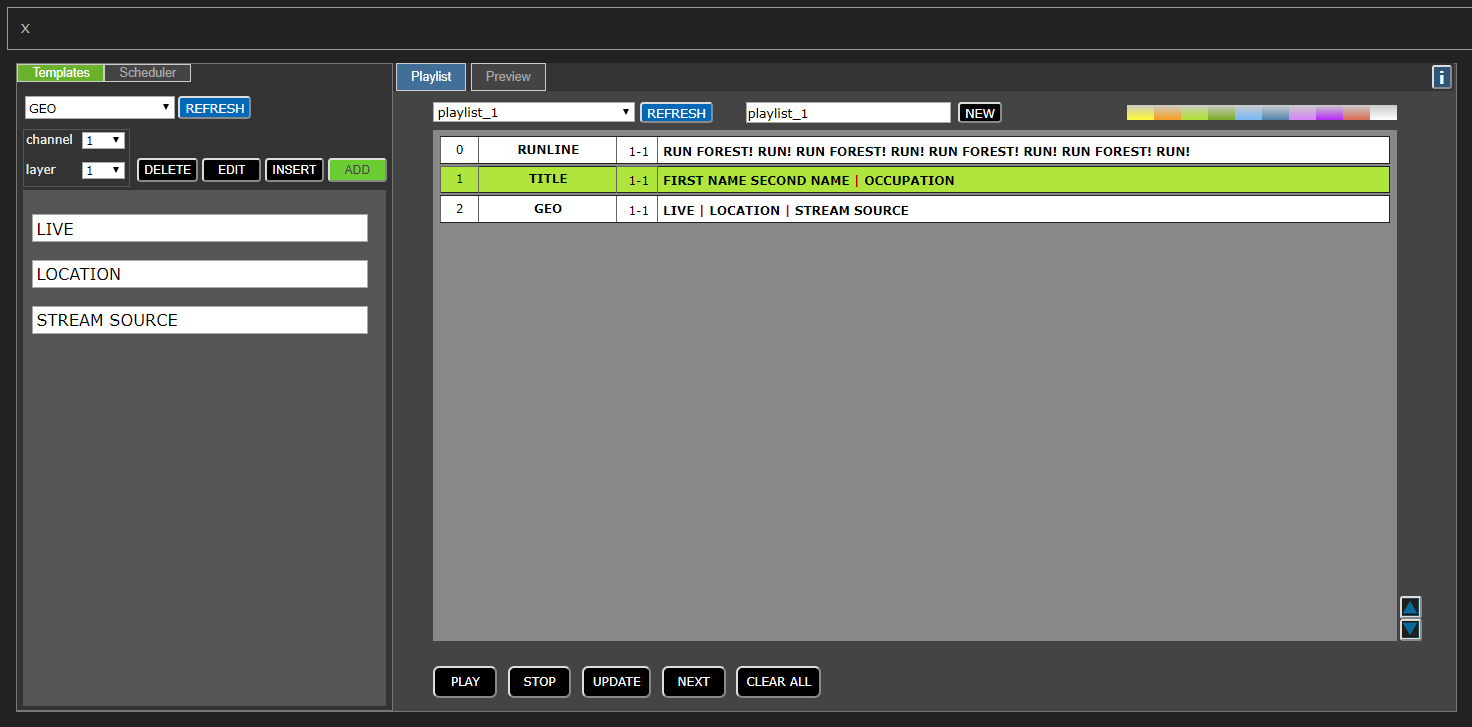
We created easy to use and minimalistic Web Client to play/edit/update your html templates on CasparCG server.
---
**Author:**  [@DmitriiPolyakov](https://casparcgforum.org/u/DmitriiPolyakov)\
**Post date:** [September 18, 2018, 4:32pm UTC](https://casparcgforum.org/t/web-client-for-html-templates/797/2 "2018-09-18T16:32:16Z")
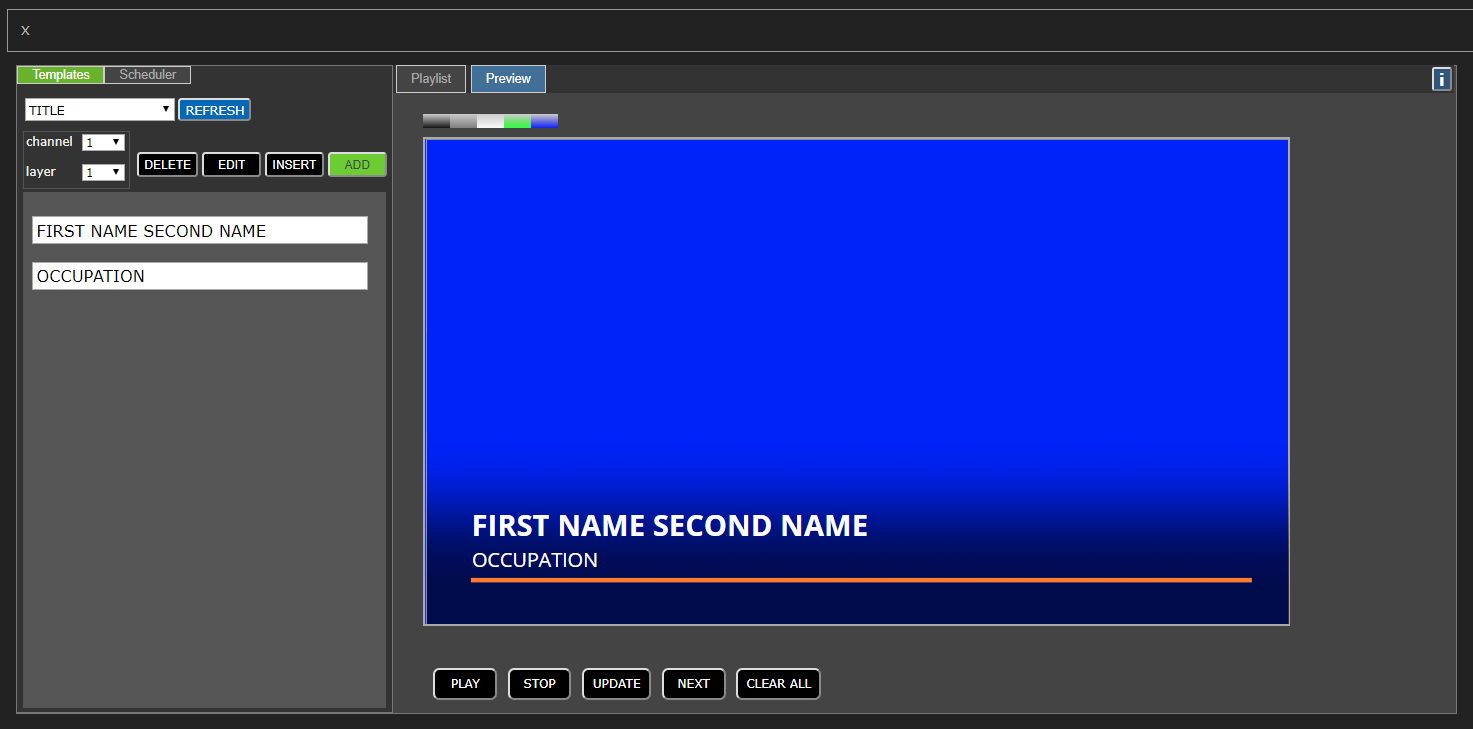
Web Client supports preview of HTML templates using browsers [iframe], so you can control templates behavior before going on Air.
You can create playlists to organize titles order, move items inside playlist or append items to playlist.
We using NodeJS web server to connect Web Client with CasparCG and manipulate file system.
Some rules and restrictions are used for HTML templates to make server and client work stable.
---
**Author:**  [@Chumby](https://casparcgforum.org/u/Chumby)\
**Post date:** [September 18, 2018, 8:55pm UTC](https://casparcgforum.org/t/web-client-for-html-templates/797/3 "2018-09-18T20:55:10Z")
Sorry Dmitrii,
Where is the Web Client?
Cheers
Chumby
---
**Author:**  [@DmitriiPolyakov](https://casparcgforum.org/u/DmitriiPolyakov)\
**Post date:** [September 19, 2018, 7:17am UTC](https://casparcgforum.org/t/web-client-for-html-templates/797/4 "2018-09-19T07:17:14Z")
Sorry Chumby, I have a issue with project location . I’ll upload it on github soon.
---
**Author:**  [@DmitriiPolyakov](https://casparcgforum.org/u/DmitriiPolyakov)\
**Post date:** [September 22, 2018, 9:16am UTC](https://casparcgforum.org/t/web-client-for-html-templates/797/5 "2018-09-22T09:16:31Z")
> **[dpolyakov31/CasparCG-web-client-for-HTML-templates](https://github.com/dpolyakov31/CasparCG-web-client-for-HTML-templates)**
>
> Contribute to dpolyakov31/CasparCG-web-client-for-HTML-templates development by creating an account on GitHub.
---
**Author:**  [@Chumby](https://casparcgforum.org/u/Chumby)\
**Post date:** [September 24, 2018, 10:52am UTC](https://casparcgforum.org/t/web-client-for-html-templates/797/6 "2018-09-24T10:52:47Z")
Great… will download and have a look Dmitri.
Is there anything special needed to get this system working?
Cheers
Chumby
---
**Author:**  [@DmitriiPolyakov](https://casparcgforum.org/u/DmitriiPolyakov)\
**Post date:** [September 24, 2018, 12:31pm UTC](https://casparcgforum.org/t/web-client-for-html-templates/797/7 "2018-09-24T12:31:17Z")
Do you have experience with Node.js? Any way, you have to instal Node.js. Run app.js. Type localhost:8080 in browser, and have a nice day.
---
**Author:**  [@Chumby](https://casparcgforum.org/u/Chumby)\
**Post date:** [September 24, 2018, 9:03pm UTC](https://casparcgforum.org/t/web-client-for-html-templates/797/8 "2018-09-24T21:03:31Z")
Thankds Dimitri - no experience with Node.js Will do what you suggest here. Thanks for putting this all together.
Cheers,
Chumby
---
**Author:**  [@Chumby](https://casparcgforum.org/u/Chumby)\
**Post date:** [September 24, 2018, 11:47pm UTC](https://casparcgforum.org/t/web-client-for-html-templates/797/9 "2018-09-24T23:47:15Z")
Hi Dimitri,
I have installed node.js. I changed the config file within your app so that it pointing to my caspercg install. I started the caspercg server and then I ran app.js. All looks fine. When I go to localhost:8080 however, the webpage loads, but it is stuck on the …Loading message. I cannot get any further than that.
Is there a step I am not doing correctly here?
Cheers,
Chumby
---
**Author:**  [@DmitriiPolyakov](https://casparcgforum.org/u/DmitriiPolyakov)\
**Post date:** [September 25, 2018, 9:23am UTC](https://casparcgforum.org/t/web-client-for-html-templates/797/10 "2018-09-25T09:23:36Z")
This issue possible when the web client does not receive templates. The cause of it is wrong path to the folder with templates in the config file. We will fix this moment. Sorry for that.
---
**Author:**  [@Klepa](https://casparcgforum.org/u/Klepa)\
**Post date:** [September 25, 2018, 9:46am UTC](https://casparcgforum.org/t/web-client-for-html-templates/797/11 "2018-09-25T09:46:32Z")
CasparCG server version has to be 2.1.0 to properly run web client. Caspar versoins older then 2.1.0, do not send templates tag “HTML”, so nodeJS server can’t recognize wich templates are HTML.
---
**Author:**  [@Chumby](https://casparcgforum.org/u/Chumby)\
**Post date:** [September 25, 2018, 10:01am UTC](https://casparcgforum.org/t/web-client-for-html-templates/797/12 "2018-09-25T10:01:52Z")
Yes thank Klepa. Have the 2.10 BETA CasperCG running.
Cheers,
Chumby
---
**Author:**  [@DmitriiPolyakov](https://casparcgforum.org/u/DmitriiPolyakov)\
**Post date:** [September 25, 2018, 1:12pm UTC](https://casparcgforum.org/t/web-client-for-html-templates/797/13 "2018-09-25T13:12:32Z")
The updated client are available on Git.
---
**Author:**  [@bern333](https://casparcgforum.org/u/bern333)\
**Post date:** [October 5, 2018, 9:30am UTC](https://casparcgforum.org/t/web-client-for-html-templates/797/14 "2018-10-05T09:30:33Z")
I’m stuck at “Loading…” too.
It’s taken me a good long time to get the config file to work, as the original has folder names with lots of spaces, which was confusing.
My working config file, which allows me to get to the server page, is -
{
“caspar\_ip”: “localhost”,
“caspar\_port”: “5250”,
“caspar\_dir”: “g:/caspar/2\_1/template”,
“ws\_port”: “8084”,
“playlistdir”: “./playlist/”,
“archivedir”: “./archive/”,
“titleChannels”: “1”
}
Where the CasparCG server template page is g:/caspar/2\_1/template .
Caspar receives a TLS and “Sends more than 512 bytes to 127.0.0.1”, but nothing happens on the webpage. The console says -
G:\caspar\caspar\_html\Client\>node app.js
auto reconnect in 5s
Server running on 8080…
ok
removed all files web server templates folder
Caspar tamplates folder copied to web server
1
websocket server started
Hello
{“service”:“toserver”,“command”:“getTemplates”,“layer”:null,“titles”:null,“id”:null,“channel”:null}
getTemplates
{“service”:“toserver”,“command”:“getPlaylists”,“layer”:null,“titles”:null,“id”:null,“channel”:null}
{“service”:“toserver”,“command”:“getChannels”,“layer”:null,“titles”:null,“id”:null,“channel”:null}
{}
The log file lists the CasparCg commands and all the contents of the template folder
I’ve obviously failed to do something, but I’m out of ideas now. Any guidance available please Dmitrii ?
Bernie
---
**Author:**  [@bern333](https://casparcgforum.org/u/bern333)\
**Post date:** [October 8, 2018, 1:39pm UTC](https://casparcgforum.org/t/web-client-for-html-templates/797/15 "2018-10-08T13:39:06Z")
OK. I’ve sorted the “LOADING…” problem. It was because i was using another version of the server to experiment with, and started the wrong one. All my fault, sorry
B
---
**Author:**  [@musicman\_08](https://casparcgforum.org/u/musicman_08)\
**Post date:** [January 20, 2019, 5:12am UTC](https://casparcgforum.org/t/web-client-for-html-templates/797/16 "2019-01-20T05:12:58Z")
I also have an error “ **LOADING…** ”. In Google Chrome have error:
Uncaught TypeError: Cannot read property ‘includes’ of undefined
at createTemplateList (script.js?n=1:453)
at WebSocket.socketMassage (script.js?n=1:245)
**DmitriiPolyakov** сan you help?
---
**Author:**  [@candidoa](https://casparcgforum.org/u/candidoa)\
**Post date:** [August 20, 2020, 11:14am UTC](https://casparcgforum.org/t/web-client-for-html-templates/797/17 "2020-08-20T11:14:21Z")
did you solve the problem?
---
**Author:**  [@mos1907](https://casparcgforum.org/u/mos1907)\
**Post date:** [March 10, 2022, 10:20am UTC](https://casparcgforum.org/t/web-client-for-html-templates/797/18 "2022-03-10T10:20:54Z")
Hello **DmitriiPolyakov** , may I get an example playlist file, I guess client not opening with empty playlist folder.
Best
---
**Author:**  [@hrasokat](https://casparcgforum.org/u/hrasokat)\
**Post date:** [August 19, 2024, 8:29am UTC](https://casparcgforum.org/t/web-client-for-html-templates/797/19 "2024-08-19T08:29:19Z")
Hello DmitriiPolyakov,
i am using the 2.4.0 Server with the 2.3.0 Client and i dont get your web client to work. I ran the app.js file and everything but at first, i am also stuck in the loading screen and after a few seconds it just says “Server connection has closed!”.
Do you know if its a version based error?
Cheers
Henri
---
**Author:**  [@didikunz](https://casparcgforum.org/u/didikunz)\
**Post date:** [August 19, 2024, 10:08am UTC](https://casparcgforum.org/t/web-client-for-html-templates/797/20 "2024-08-19T10:08:48Z")
Usually this happens, when CasparCG servee is not run as administrator.
[Next page](https://casparcgforum.org/t/web-client-for-html-templates/797.md?page=2)