\
**Category:** General\
**Tags:** template, html\
**Created:** [November 8, 2025, 1:06am UTC](https://casparcgforum.org/t/html-template-blurred-rasterizing-issue/7448 "2025-11-08T01:06:00Z")\
**Posts on this page:** 7\
**Page:** 1
**Author:**  [@Loxium](https://casparcgforum.org/u/Loxium)\
**Post date:** [November 8, 2025, 1:06am UTC](https://casparcgforum.org/t/html-template-blurred-rasterizing-issue/7448/1 "2025-11-08T01:06:00Z")
Hello,
I use StreamShapers Ferryman for use After Effects animation (converted by Bodymovin) on CasparCG. This is a DSK created by vectorial shape. When I play the graphics it seems blurred, like the border are not precise.
For compare I have export the animation directly in video and we look better the problem (on the left the AE export and on the right the result when play in Caspar.)

I’am thinking about a scalling or an rasterization issue but after few hours of search on this forum and in the web I don’t found any answer.
I was going into the chrome://gpu/ and this is the results (Strange results I think):
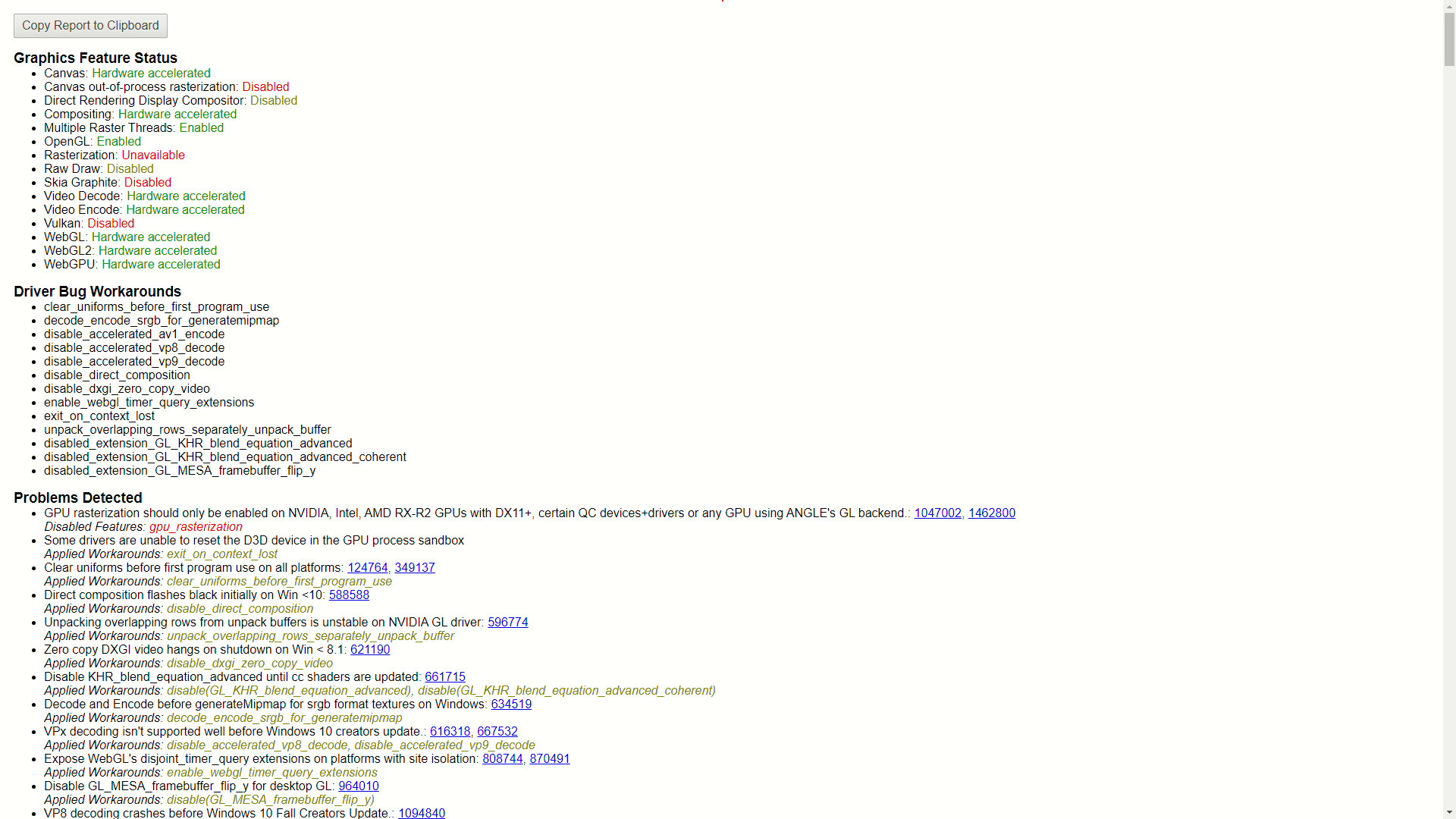
I use CasparCG 2.4.3 on WIndows 10 with an NVIDIA GeForce RTX 4060 Ti and for an extract of my config (the rest is by default)
```auto
1080p2500
Caspar CG 1
true
```
I join the JSON used in Ferryman [here](https://drive.google.com/file/d/1lUeFopaMrfJ2O7XjNKxaL39eYso3lhoI/view?usp=sharing).
Thaks you very much by advance for you help !
Sincerely,
(Sorry for my english, Im french)
---
**Author:**  [@didikunz](https://casparcgforum.org/u/didikunz)\
**Post date:** [November 8, 2025, 12:17pm UTC](https://casparcgforum.org/t/html-template-blurred-rasterizing-issue/7448/2 "2025-11-08T12:17:50Z")
Is the screen capture, that you posted (the side by side one) actually done from the video out? What do you do with the NDI?
To me it looks like a wrongly setup keyer.
---
**Author:**  [@Loxium](https://casparcgforum.org/u/Loxium)\
**Post date:** [November 8, 2025, 5:21pm UTC](https://casparcgforum.org/t/html-template-blurred-rasterizing-issue/7448/3 "2025-11-08T17:21:54Z")
Yes ! It’s a capture from the out (NDI). (I send the un-crop capture with an picturein background later today)
Depending on the case or the project, NDI is final output or use like a keyer on OBS.
For the moment I can’t test with a decklink output but if you would I can test with the screen consumer.
---
**Author:**  [@didikunz](https://casparcgforum.org/u/didikunz)\
**Post date:** [November 8, 2025, 5:42pm UTC](https://casparcgforum.org/t/html-template-blurred-rasterizing-issue/7448/4 "2025-11-08T17:42:00Z")
Yes, it would make sense to capture with the screen consumer. Because then we know, if it’s a Caspar problem or one in OBS.
---
**Author:**  [@noumaan](https://casparcgforum.org/u/noumaan)\
**Post date:** [November 8, 2025, 6:12pm UTC](https://casparcgforum.org/t/html-template-blurred-rasterizing-issue/7448/5 "2025-11-08T18:12:36Z")
you can also test by exporting still frame
`ADD 1 IMAGE filename`
---
**Author:**  [@Loxium](https://casparcgforum.org/u/Loxium)\
**Post date:** [November 8, 2025, 10:31pm UTC](https://casparcgforum.org/t/html-template-blurred-rasterizing-issue/7448/6 "2025-11-08T22:31:01Z")
Capture of the screen consumer :

Few captures with “ADD 1 IMAGE”


---
**Author:**  [@Loxium](https://casparcgforum.org/u/Loxium)\
**Post date:** [December 19, 2025, 7:36pm UTC](https://casparcgforum.org/t/html-template-blurred-rasterizing-issue/7448/7 "2025-12-19T19:36:33Z")
It’s better with the new 2.5.0 version !

“L” is not perfect but the circles are good.